// Architecture
How It Fits Together
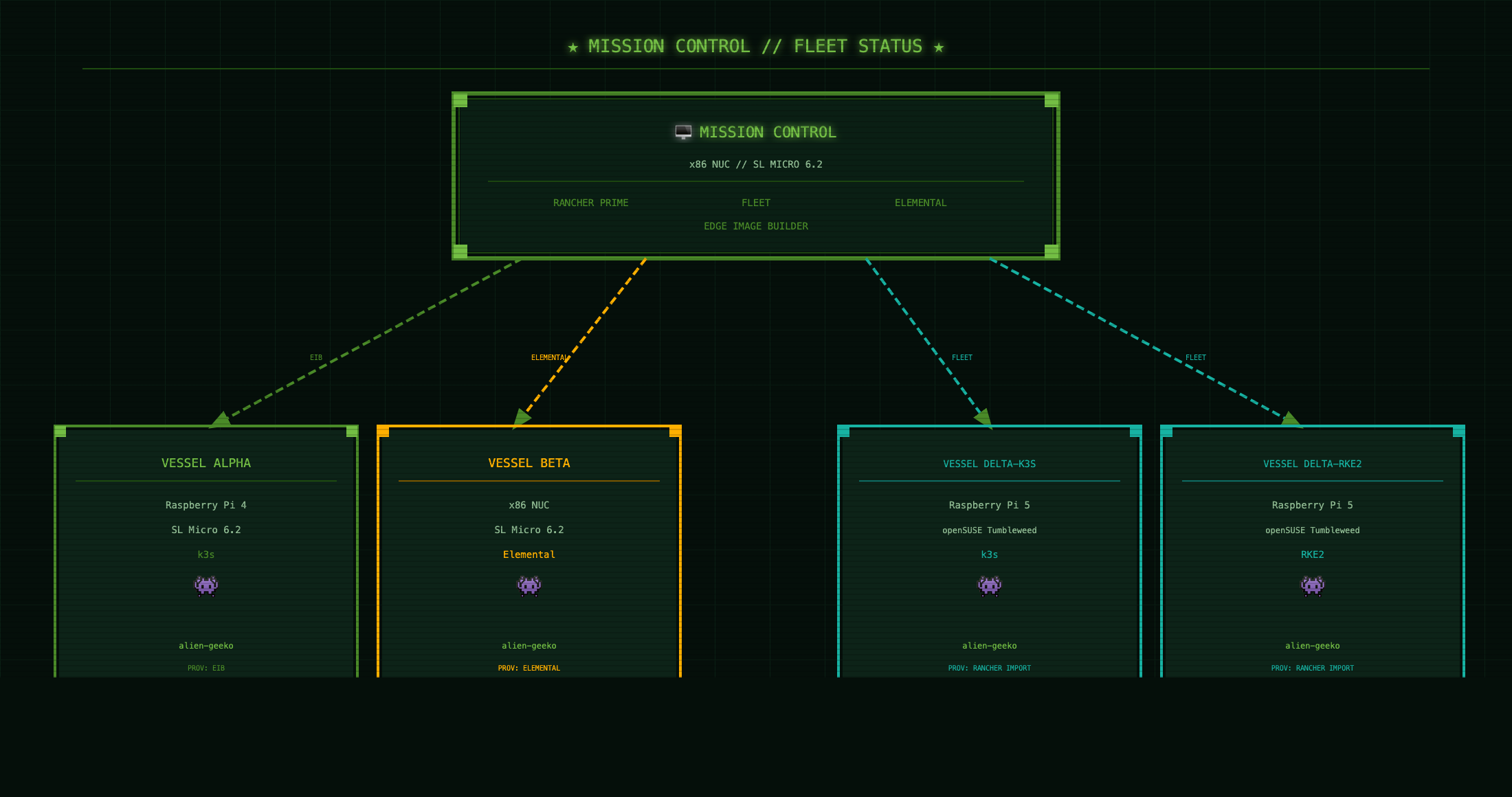
Mission Control manages the full fleet from a single pane. Fleet pulls from GitHub and routes the right Kustomize overlay to each vessel based on labels.
KubeCon + CloudNativeCon Demo
A live edge computing demo running on a fleet of Raspberry Pi boards and x86 NUCs. One management plane. Five vessels. Three provisioning methods. Zero manual config after launch.
View on GitHub// Architecture
Mission Control manages the full fleet from a single pane. Fleet pulls from GitHub and routes the right Kustomize overlay to each vessel based on labels.
// Fleet status
Every vessel runs the same app — alien-geeko — deployed automatically by Fleet the moment the cluster appears in Rancher. No SSH. No manual apply. The app shows live cluster vitals directly in the browser.
// Provisioning paths
Every edge environment is different. SUSE Edge 3.5 covers all three scenarios in a single platform.
EIB // Edge Image Builder
Build a raw disk image with the OS, k3s, users, and SSH keys baked in. Write it to SD card with dd. Boot the Pi. It joins the fleet on first power-on. No network calls. No interactive setup.
Elemental // Phone-Home
Boot from an Elemental-enabled image. The node calls back to Rancher automatically, appears in the Elemental inventory, and waits for cluster assignment. Fleet delivers the workload within seconds.
Rancher Import
Install k3s or RKE2 on any Linux. Apply one kubectl command from Rancher. The cluster agent establishes contact. Fleet takes it from there. Used for Pi 5 boards not yet supported in SL Micro.
// Application
A Node.js app that queries the Kubernetes API at runtime and renders live cluster vitals in a Nostromo CRT terminal UI. No database. No persistent storage. Just a service account token, the K8s API, and a 60-second cache to go easy on the Pi.
The same container image runs on amd64 and arm64. A Helm chart handles the full deployment — namespace, RBAC, deployment, service. Fleet sets the cluster display name per target via Helm values. No Kustomize patches needed.
# What the app surfaces per cluster
GET /api/info

{
  "clusterName":   "VESSEL-ALPHA",
  "k8sVersion":    "v1.29.3+k3s1",
  "distribution":  "k3s",
  "nodeCount":     1,
  "arch":          "arm64",
  "osImage":       "SL-Micro 6.2",
  "nodeRole":      "control-plane",
  "cpuCount":      4,
  "loadAvg":       "0.42 0.38 0.31"
}
// Stack
// Deployment
Install via Helm directly, or let Fleet manage the full fleet lifecycle — both paths use the same chart.
# Option A — standalone Helm install
helm repo add alien-geeko https://avaleror.github.io/alien-geeko-demo
helm repo update
helm install alien-geeko alien-geeko/alien-geeko \
  --namespace alien-geeko \
  --create-namespace \
  --set clusterName=MY-CLUSTER

# Option B — Fleet GitOps (clusterName set per target in fleet.yaml)
Continuous Delivery > Git Repos > Add Repository
URL:    https://github.com/avaleror/alien-geeko-demo
Branch: main

# Label your clusters so Fleet routes to the right values
demo=true  +  edge-type=pi-cluster       → clusterName: PI-CLUSTER-ARM64
demo=true  +  edge-type=x86-elemental    → clusterName: VESSEL-BETA-ELEMENTAL
demo=true  +  edge-type=pi5-k3s         → clusterName: VESSEL-DELTA-K3S
demo=true  +  edge-type=pi5-rke2        → clusterName: VESSEL-DELTA-RKE2
demo=true  +  edge-type=x86-cluster     → clusterName: X86-EDGE-NODE

# Verify
kubectl auth can-i list nodes \
  --as=system:serviceaccount:alien-geeko:alien-geeko
yes